
Knowledge
Evidence workspace
A visual guide to the DrowAI Knowledge Evidence tab and bounded evidence preview drawer.
The Evidence tab gives operators a durable view of archived task material. It helps connect findings, assets, services, and reports back to the source output that supports them.
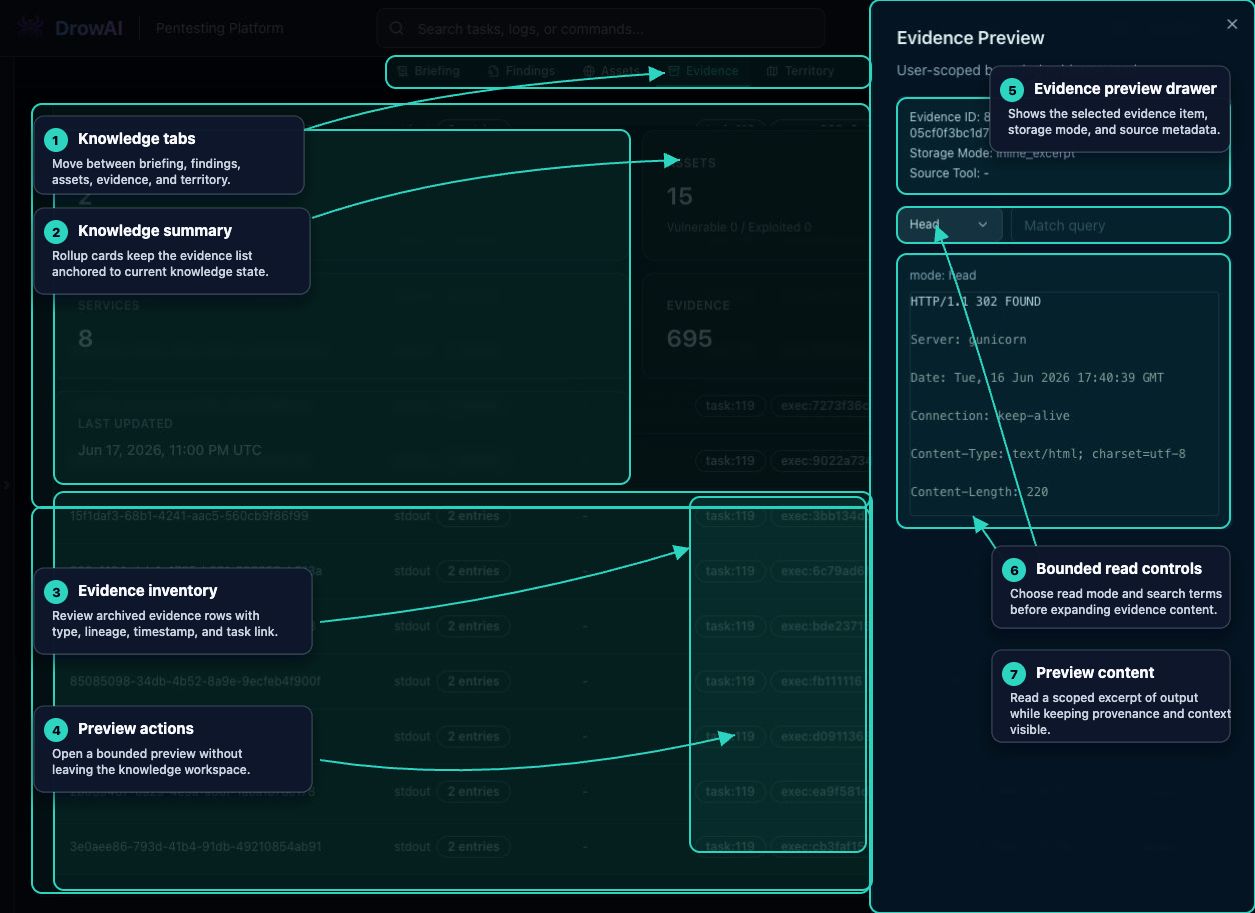
Primary regions
- Knowledge tabs switch between Briefing, Findings, Assets, Evidence, and Territory.
- Summary cards keep the evidence list anchored to the current knowledge state.
- Filters narrow evidence by source tool, evidence type, or search text.
- The evidence catalog lists evidence ID, type, source tool, task/execution lineage, observed time, and preview action.
- Evidence from the same execution may be grouped so related entries can be expanded together.
- Preview actions open a bounded evidence drawer without leaving the workspace.
- The evidence drawer shows selected evidence metadata, read mode, optional match query, and a scoped content preview.
- Close preview returns the operator to the evidence list.
How to use it
Use Evidence when you need to verify where a finding or report statement came from. Preview enough source material to confirm context, then return to the asset, finding, or report workflow that needs the evidence.
Public-safe handling
Evidence can contain sensitive command output, service banners, paths, credentials, or target details. Public documentation should use approved lab examples or mask content when the evidence came from real customer work.